
An engineering calculation or data selected from a database is not necessarily usable documentation by itself. Results often have to be copied into an Excel workbook, arranged in a consistent format, and supplemented with a title, identifiers, notes and other accompanying information.
This manual work is not only time-consuming but also creates opportunities for errors. A mistyped value, an omitted table row or data accidentally left over from an earlier document can easily lead to misunderstandings.
The WeldExp Modules Document Template Manager, or DTM, provides a solution to this problem.
What is Document Template Manager?
DTM is a central document-template management system. Its task is to fill predefined document templates with data and calculation results produced by the different WeldExp modules.
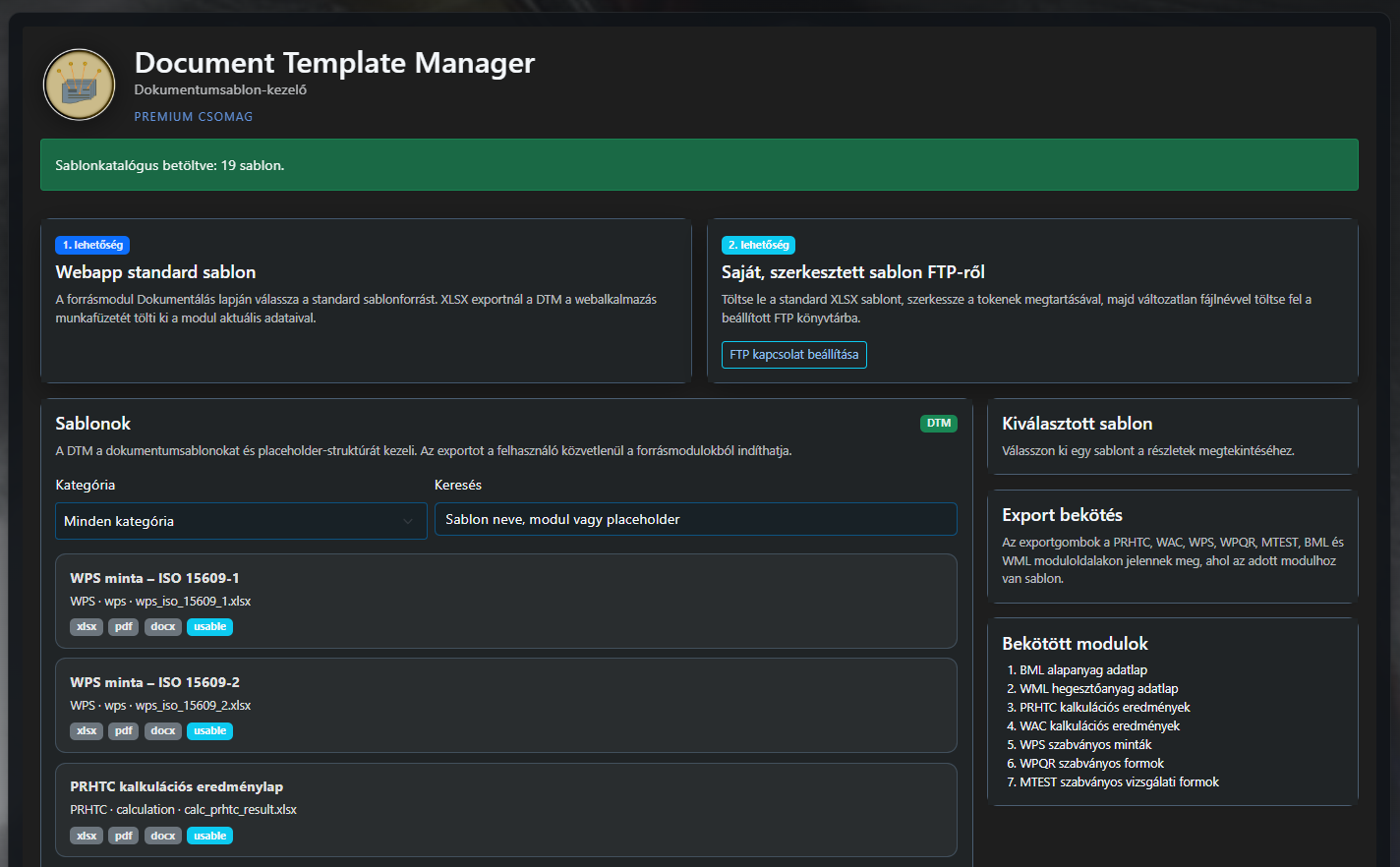
For example, the system can create:
- a calculation result sheet from calculator results;
- a technical datasheet from a selected base material;
- a product or technology datasheet from welding-consumable data;
- a standardised document from WPS or WPQR data;
- consistent summary documentation from a register.
These documents can be generated from the available data.
Completed documents can be saved in Excel, PDF or Word format. DTM does not, however, take over the role of the source modules. Calculations, data management and data verification still take place in the relevant WeldExp module, while DTM provides a consistent framework for document templates and document generation.
Why is consistent document generation important?
Correct data is not the only important aspect of technical documentation. It is equally important that documents are produced in a clear, consistent and reusable format.
If the result sheet has to be created manually after every calculation, the same work must be repeated again and again. In addition, the layout, terminology and data content of the documents can easily become inconsistent.
The purpose of DTM is to automate the repetitive parts of document generation. After the appropriate template is selected, the system fills the document with the current data from the module. This reduces manual copying while keeping the document structure consistent.
This can be particularly useful in workflows where datasheets, reports or calculation summaries with a similar structure must be produced regularly.
Document generation starts in the source module
The user does not have to open the DTM module separately every time and manually copy calculation results into it.
Export can be started directly from the Documentation tab of the relevant WeldExp module. The source module gathers the current data, and DTM fills the selected template with it.
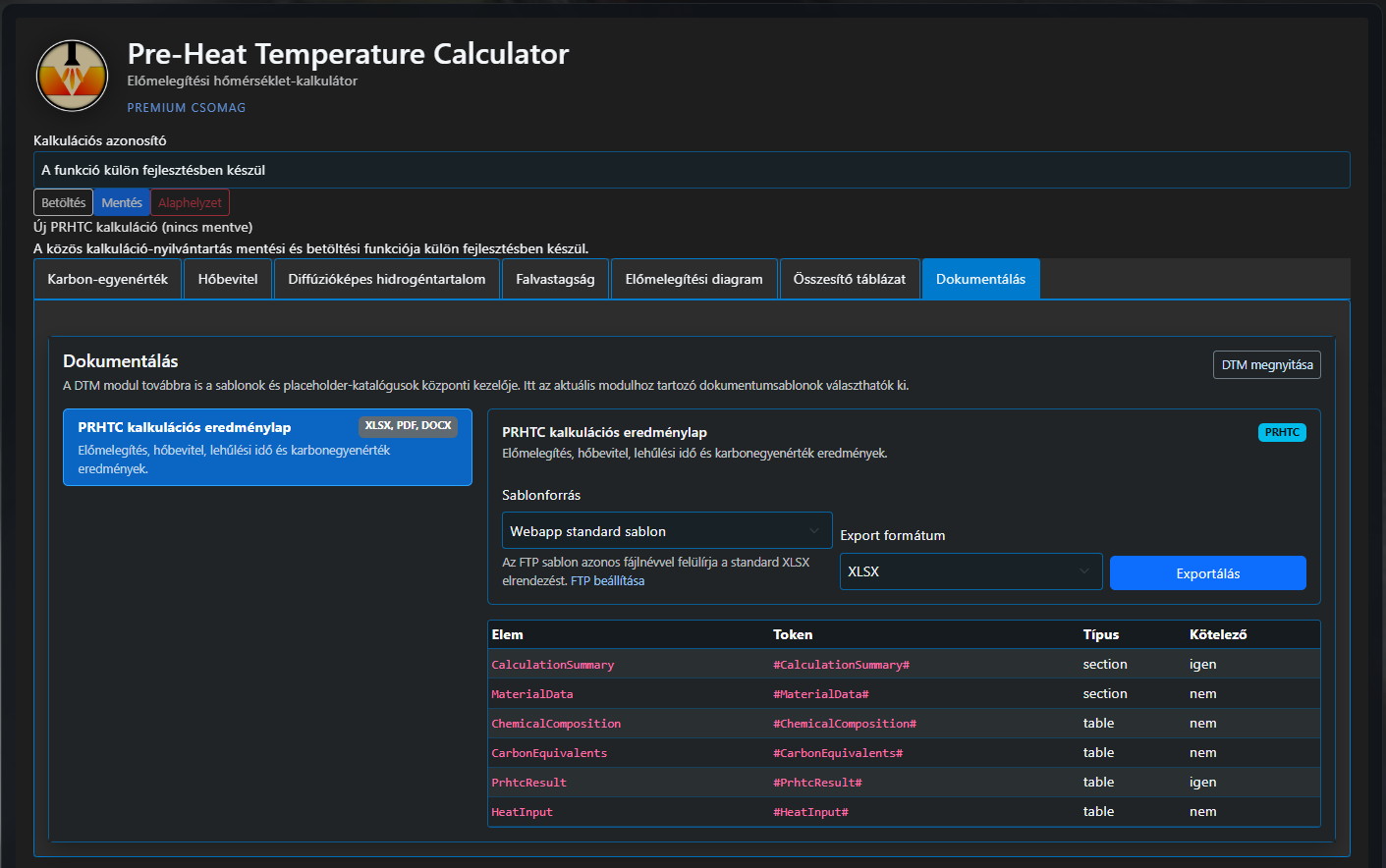
The general workflow is:
- The user performs the calculation or selects the data to be documented.
- The user opens the module's Documentation tab.
- The desired document template is selected.
- The required output format is selected.
- DTM creates the completed document.
DTM's own interface is primarily used to review the available templates and their associated variables. Templates can be filtered by category and searched by name, module or document variable.
Standard and custom document templates
DTM supports two types of template source.
Web-app standard template
Standard templates are included with WeldExp Modules. These are prepared workbooks that expect module data at predefined locations.
This option is useful when a consistent document needs to be created quickly without additional configuration.
Custom edited template
Standard Excel templates can also be used as a starting point. The workbook layout, header content, colours, logos and other visual elements can be modified freely as long as the tokens representing document variables are preserved.
The edited template can be uploaded under the same filename to the user's own FTP or FTPS directory. During export, the user can then choose whether DTM should use the WeldExp standard template or the custom edited version.
This allows a company or technical organisation to produce result sheets with its own branding, header and document structure without changing the WeldExp program code.
How does the data get to the right place?
Templates contain so-called placeholder tokens, which are placeholder variables.
A token might look like this:
#MaterialName#
When the document is created, DTM replaces this marker with the actual material name.
Further examples include:
#DocumentTitle#– document title;#GeneratedAt#– date of generation;#ChemicalComposition#– chemical-composition table;#MechParam#– mechanical properties;#PrhtcResult#– preheating or thermal results;#WacResult#– Cr and Ni equivalents and related results.
Variables can represent more than simple text or numbers. DTM can also handle tabular data rows, optional document sections and, in the future, diagrams and images.
The tokens are visible only while the template is being edited. The finished document contains the actual data, tables and labels.
More than simple data copying
For Excel export, DTM does not build an entirely new plain spreadsheet. Instead, it replaces the defined tokens and data ranges within the structure of the original XLSX template.
As a result, the following can be preserved:
- worksheets;
- cell styles;
- formulas;
- column widths and row heights;
- print settings;
- custom header and branding elements.
This is important because the user receives not merely a raw data export but an editable, formatted workbook.
PDF and Word output, in parallel, support the creation of more finalised documents that are easier to distribute, archive or attach to other technical documentation.
What documents can be created with DTM?
The DTM template catalogue can be extended continuously. The system design is not tied to a single document type.
The current development direction includes, among others, the following document groups:
Calculation result sheets
Results from PRHTC, WAC, WGC and other engineering calculators can be organised into consistent calculation summaries. The document can include input data, intermediate calculation values, final results and evaluations.
Base-material and welding-consumable datasheets
Datasheets can be generated from the BML and WML modules that summarise identification data, chemical composition, mechanical properties and technological characteristics in a single document.
WPS and WPQR documents
For welding instructions and welding procedure qualification documents, consistent use of standardised field groups is particularly important. DTM can therefore manage several templates adapted to different standards or welding processes.
Test reports
Separate document templates can be assigned to mechanical and technological tests. This allows consistent reports to be generated, for example, from tensile, bend, impact or hardness test results.
Personnel and equipment registers
The system design also supports documentation of personnel, competence, equipment, maintenance and calibration registers.
Some document types in the template catalogue are already marked as usable while others are planned. This allows DTM capabilities to expand gradually together with additional WeldExp modules.
Permissions and security
For document generation, it is not enough merely to hide options in the user interface when the user does not have permission to use them.
The DTM export process therefore also checks the required module permissions on the server side. A document can be generated only if the user has the appropriate access to both the source module and the DTM module.
Additional security checks apply when a custom FTP template is used. The system accepts only the exact filename listed in the DTM catalogue, restricts the file size and verifies that the file is genuinely in XLSX format. FTPS is recommended to protect data during transfer.
The goal is to make custom templates usable without turning them into a route for downloading arbitrary remote files.
More than an export function
In the longer term, DTM is not simply another “Download as Excel” button.
The module creates a common documentation layer that separates:
- generation of technical data;
- the content structure of the document;
- appearance and branding;
- and the final file format.
As a result, several different documents can be generated from the same data. A calculation result, for example, can appear in a detailed Excel workbook, a distributable PDF result sheet or later as part of more complex project documentation.
Summary
The purpose of Document Template Manager is to connect technical data created in WeldExp modules with documents that can be used in everyday work.
The system can reduce manual data copying, make result sheets more consistent and allow the same document-generation process to operate with either standard templates or templates carrying custom branding.
As DTM develops, WeldExp Modules will provide not only calculation and data-management tools but will also gradually establish a consistent technical-documentation environment.